 Screenpresso


February 11, 2021
1.8.6
Experience improvement
- The edited image is now automatically saved after each action. You may disable it via the advanced setting named "EditorAutoSave"
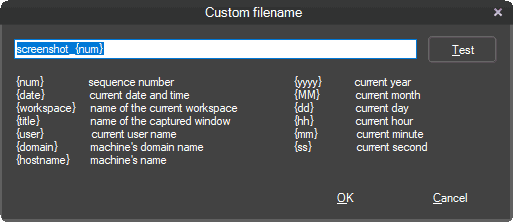
- Added custom value for custom filename setting. Now you can provide a value for the filename after each capture
- OCR now supports all languages. Refer to chapter 7.7 of the user manual (press F1 from Screenpresso to open it)
- Android: added an advanced setting "AndroidBitRate" for setting the video quality (in Mbps) for Android video recording. Default value is empty which uses the default Android's value that is 20Mbps
- Added the description of some advanced settings to the user manual
Bug fix
- Fixed drag and drop. When you drag a media from the workspace to a folder in the Windows' file explorer, the corresponding thumbnail image is now deleted from Screenpresso
- Improved the startup stability (fix "XML" issue on loading)
- Improved the media player startup stability
- The video recorder is even more stable
Downloads for 1.8.6.0
January 19, 2021
1.8.5
New video player engine
- The video player used in the preview window (shown after a recording) has been completly reworked.
- The new player is faster, more stable and uses less CPU resources.
Bug fix
- Improved the startup stability (fix "XML" issue on loading).
- Improved the general stability (fix interprocess issues).
- Fixed OCR issue on Japanese language.
- Fixed the image copy/paste issue from Outlook to Screenpresso.
Minor look change
- The Screenpresso windows are not round anymore but a little more square to follow Windows 10 aesthetics.
September 2, 2020
1.8.4
Migration to Microsoft .NET 4.8 Framework
Following Microsoft updates for performance and security, Screenpresso runs now on .NET 4.8 framework.
- Install the latest version of the .NET Framework on your computer using this Microsoft link if you are not using Windows 10.
- If you are using Windows 10, you already have the right version.
- If you want to know which frameworks you have, you can use this tool.
What's new?
- Bug fixes
July 24, 2020
1.8.3
Migration to Microsoft .NET 4.8 Framework
Following Microsoft updates for performance and security, Screenpresso runs now on .NET 4.8 framework.
- Install the latest version of the .NET Framework on your computer using this Microsoft link if you are not using Windows 10.
- If you are using Windows 10, you already have the right version.
- If you want to know which frameworks you have, you can use this tool.
What's new?
- Capture: fixed clipboard issue.
- Video: improved video recording stability.
- What's new window: removed the display of JS errors when the release note is loaded and the embedded browser lacks some JS capabilities.
- Update hotkey engine for users that install Screenpresso in Program Files folder (.NET 2.0 apis are not used anymore).
June 23, 2020
1.8.2
Migration to Microsoft .NET 4.8 Framework
Following Microsoft updates for performance and security, Screenpresso runs now on .NET 4.8 framework.
- Install the latest version of the .NET Framework on your computer using this Microsoft link if you are not using Windows 10.
- If you are using Windows 10, you already have the right version.
- If you want to know which frameworks you have, you can use this tool.
Others
- Capture: fixed delay screenshot feature
- OCR: updated engine and added support for Portuguese and Brazilian
- Added 'EditorSavePosition' advanced setting
- Fixed crashed during update
June 19, 2020
1.8.1
Migration to Microsoft .NET 4.8 Framework
Following Microsoft updates for performance and security, Screenpresso runs now on .NET 4.8 framework.
- Install the latest version of the .NET Framework on your computer using this Microsoft link if you are not using Windows 10.
- If you are using Windows 10, you already have the right version.
- If you want to know which frameworks you have, you can use this tool.
Others
- Added "NoOcr" policy
- Added "MergeVideos" command line
- Color picker: removed the '#' character in the captured color value
- Capture: fixed ScreenshotDelay feature
- Workspace: added a tooltip to explain how to organize up or down the workspaces
- Editor: fixed the canvas when cropping outside the original content
- Editor: fixed an issue with the zoom
- Editor: fixed a crash when deleting all numbered items
- Video: fixed error message when the disk is full
- Workspace: the window is not topmost anymore
- Sharing: fixed an issue with Evernote
- Changed default value of advanced setting named "SnappingDepth" from 1 to 2
- Added NoErrorReportingEmail policy
- Improved the clipboard
- Improved Live Update engine
- Improved FIPS support
- Restored version to Windows' field named "ProductInfo"
- Updated to the latest version of NAudio library for better sound recording
May 29, 2020
1.8.0
Migration to Microsoft .NET 4.8 Framework
Following Microsoft updates for performance and security, Screenpresso runs now on .NET 4.8 framework.
- Install the latest version of the .NET Framework on your computer using this Microsoft link if you are not using Windows 10.
- If you are using Windows 10, you already have the right version.
- If you want to know which frameworks you have, you can use this tool.
Capture
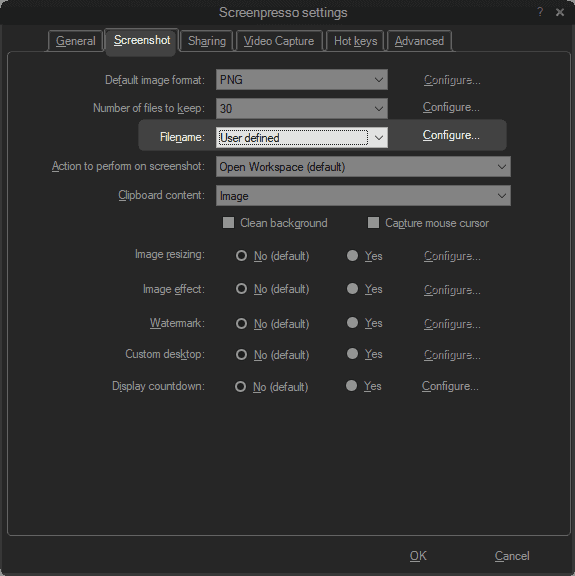
Improved custom filename
The configuration of a custom filename for screenshots is enhanced, and more options are available.
- Choose "User-defined" and click on the configure button:
- Define your filename pattern with predefined placeholders:
The 2 minutes limit length for animated gif is removed
Animated GIFs should be short and lightweight. That's why we recommend keeping GIFs video under 2 minutes length. However, Screenpresso does not hard limit it anymore.
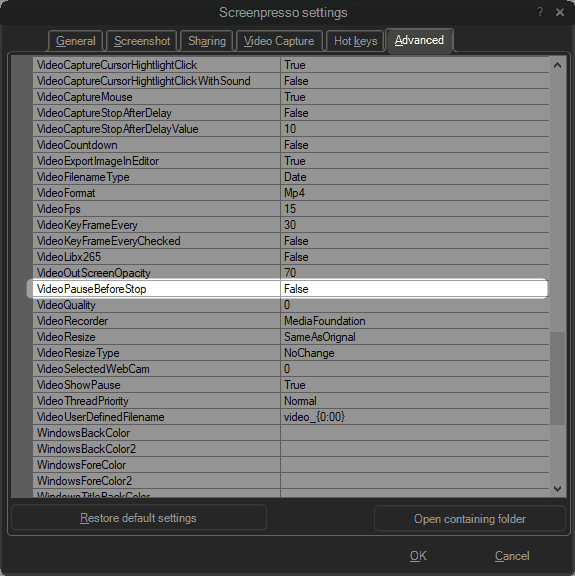
New "VideoPauseBeforeStop" advanced settings
You can resume the video recording when you stop it. The stop button acts as a pause button, and a second confirmation is needed to finalize the video.
New "SnappingDepth" advanced settings
When you start a capture, moving the mouse over a window selects it. If you set the depth value to 1 you can select the child window of this root window by moving the mouse over it. If you set a value to 2, you can select a child window of this child window, and so on... The default value is 1 but to capture only root windows in one click, you might prefer to set it to 0.
A new What's new? dialog has been added
When a new version is available, the release note is now shown directly in Screenpresso.
Updated third parties components
- The OCR is now based on Tesseract 5-alpha.
- The Google SDK v3 is now used for Google drive and Youtube integration.
Bug fixes
- Due to instabilities on Windows APIs, the Direct MP4 recording option is not supported anymore over Windows 8.
- Improved the clipboard engine. Sometimes the content was not set resulting to an empty clipboard.
- The "Reset all settings" button was not workink propertly (sharing settings were not resetted).
- The video recorder was sometimes crashing due to audio issues.
- A display issue has been fixed when printing from the workspace.
- The Check for Update window size has been fixed for windows users with font size greater than 100%.
Other embeded technologies
New interprocess communication engine
Screenpresso uses a new communication framework for interprocess communciation. It will improve performance and security.
New internal logger
As you may have seen it using the beta version of Screenpresso, we now use a new internal logger to help us diagnose issues and fix bugs.
Faster install and uninstall
Screenpresso was already quick to install, but it is even faster now on this 1.8 version.
February 17, 2020
1.7.16
- Editor: update OCR Tesserac to version 5-alpha
- New display for release notes
- Added 'OpenFileExplorerAfterProcessing' advanced setting
- Fixed an issue with latest security Microsoft patch for Windows 7
- Fixed gif video issue when video clipping was applied at the same time
- Fixed Android video recording occuring with some mobile phones
January 5, 2020
1.7.15
- Improved memory usage (some bitmaps are freed more quickly)
- Fixed wrong FFmpeg version in MSI install
December 17, 2019
1.7.14
- Fixed a bug with policies and pro license
- Removed support for Hightail sharing service since they don't provide an API anymore
- Release notes is now displayed in Screenpresso when a new official release is available
December 4, 2019
1.7.13
-
Screen resolution (DPI) is now set into the captured image file
-
Screen resolution (DPI) is now taken into account when drawing mouse cursor
-
When FFmpeg must be re-installed, now a message explains why
-
Fixed policies not applied at startup
-
Fixed app not starting with Windows on some computers
